Free Simple Resume Format PDF Download Without Watermarks
However, it is very easy to get a free, simple resume format PDF to download using Google Docs or Microsoft Word. In this guide, I have shared how you can get plenty of simple resume formats in PDF or Word format.
Quick Takeaway: Use the free english resume templates available on Google Docs and Microsoft Word wesbite to create your desired resume. There are plenty of resume’s format to choose from. I recommend editing the template online and downloading it on your computer to avoid formatting issues. Both Google and Microsoft allow you to download template in your desired PDF and Word formats. So, either download it then edit on your PC or first edit the resume online before downloading.
Quick Links To The Various Parts Of The Blog
- Steps For A Simple Resume Format PDF Download Using Google Docs
- More Stylish & Simple Microsoft Word Resume Format Option For Free Download
- Conclusion: Which Simple Resume Format Should You Use?
- FAQs
Steps For A Simple Resume Format PDF Download Using Google Docs
A simple way to create a free resume for freshers is by using Google’s free Resume template on Google Docs. It offers 5 resume templates to choose from, and once done, you are allowed to make edits and download the resume for free in the desired file format.
Just follow the Steps Below To grab a copy of the Simple Resume Format PDF Download Without Watermarks
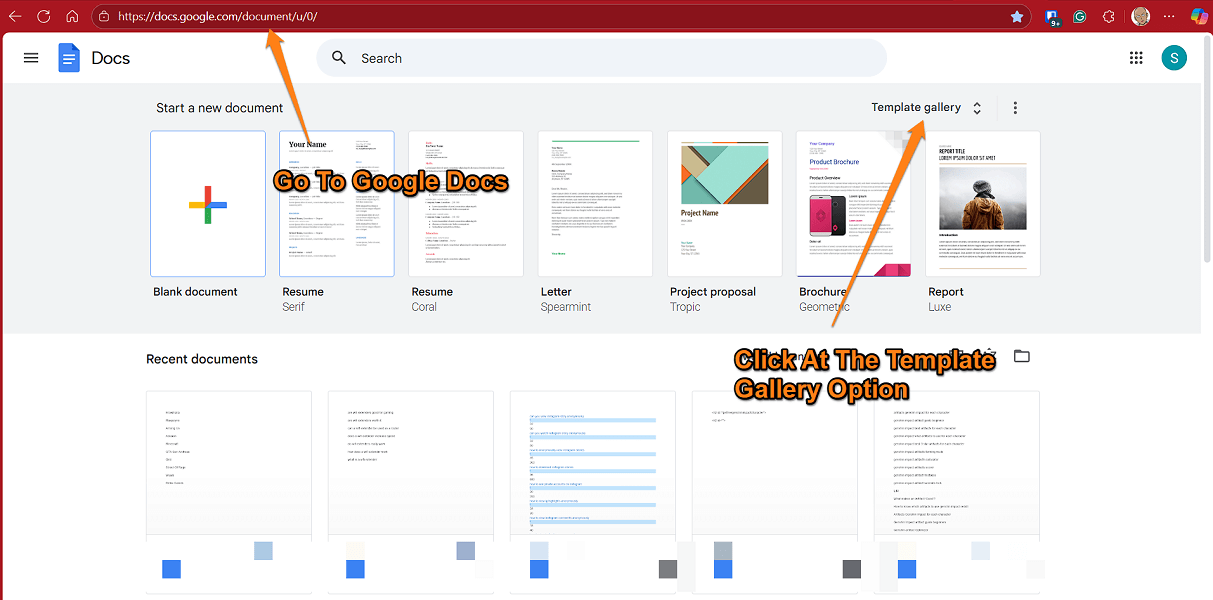
- Go to the Google Docs webpage, click on the “Template Gallery” option.
- On the next screen, you would be presented with 5 free simple resume formats. I would recommend checking each one out and selecting one that suits your needs.

- Once you have selected or finalised the simple resume format of your choice, download it by clicking on File>Download>Select PDF or Word format to download.
- We recommend making changes to the simple resume format template directly on the Google Docs page and downloading it once you have prepared the resume.

- If you want to make further edits, you can download the resume in Microsoft Word (.docx) format and edit it on your computer. If you have already finalised the resume template according to your requirements, then simply download it in PDF format.
- Moreover, you can edit the PDF resume file offline by opening it in Microsoft Word. To do that, right-click on the downloaded file, click on the “Open With” menu, and select MS Word.
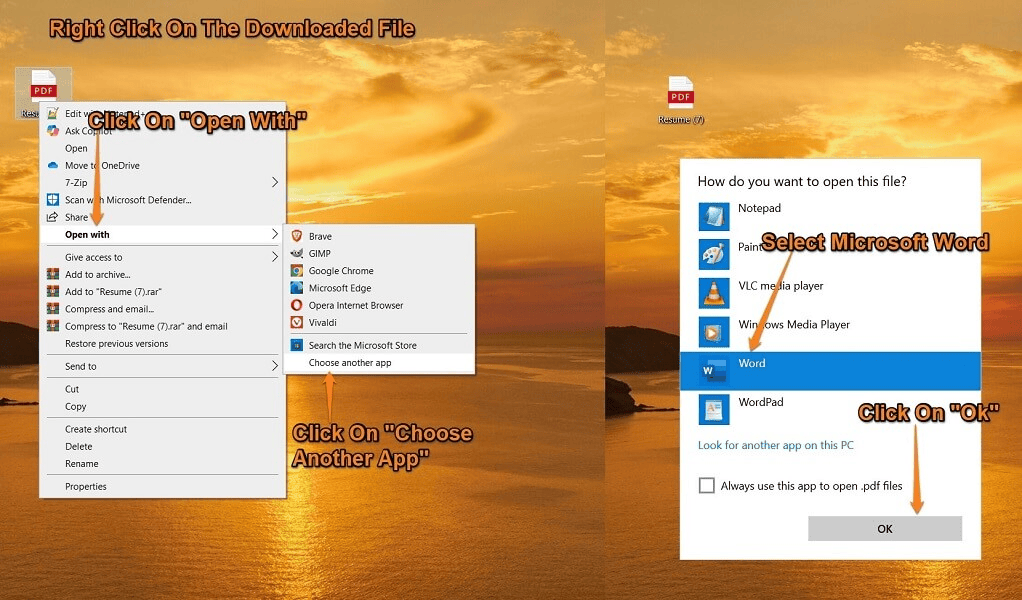
It is to be noted that it would be better to create or edit your simple resume format directly on Google Docs; opening it in Microsoft Word can cause formatting issues.
More Stylish & Simple Microsoft Word Resume Format Option For Free Download
If you don’t like the Simple Resume PDF template offered by Google, I would recommend checking out these resume templates from Microsoft or these ATS-friendly resume formats by Microsoft.
Similar to Google Docs, Microsoft allows you to either download the resume format or edit it online before saving it on your computer. To get the resume, follow the steps below.
- Open the official Microsoft link for the resume template by clicking here.
- Scroll through the webpage to see if you like any of the resume formats. Click on the free resume template of your choice.
- On the next screen, you will be asked to either “Customise in MS Word” online or “Download” it directly and edit offline on your computer.


- We would recommend editing it online, as it avoids formatting issues that arise while editing the Word documents on your computer.
- To download your edited resume, click on File>Create a Copy to download the resume in Word Doc format. For PDF format, click on File>Export>Download as PDF to get your edited resume in a PDF file. You can always edit the downloaded resume later on your computer.


You Might Be Interested In:
- Connect your GoPro to your iPhone
- Gamesir X2 USB-C Controller Review For Android
- What are artifacts in Genshin Impact?
Step-by-Step Video Tutorial To Make Resumes
https://youtu.be/SfsijgAcW30
Conclusion: Which Simple Resume Format Should You Use?
Hopefully, you were able to create an ideal, simple resume using many of the templates provided. We recommend using Google Docs, as they have an easy-to-edit and simple resume format with a PDF download option. Also, you can easily share it with others for review, make edits, or enjoy on-the-go downloads.
Microsoft templates are good, especially the ATS-friendly templates, which are difficult to find without watermarks. There are plenty of templates to choose from for both fresher and experienced folks looking for a simple resume format PDF download.
F.A.Qs
Where To Download Resume Templates For Free?
You can download free resume templates without watermarks from the Google Docs template gallery or the Microsoft webpage.
Where To Get Resume Templates?
Free English resume formats are available on Google Docs and the Microsoft Create webpage.
Where are Resume Templates In Google Docs?
On the Google Docs webpage, click on the “Template Gallery” option, and on the next screen, look for the Resume category. You will find 5 resume templates, edit online or download them to make changes offline on a PC.
Does Google Docs Have Resume Templates?
Yes, Google Docs provides free English templates without watermarks that can be downloaded in Word, PDF, Epub, and other formats.
Does Microsoft Have Resume Templates?
Yes, Microsoft has plenty of free, simple resume templates that you can download and edit for free on their website.

Leave a Reply